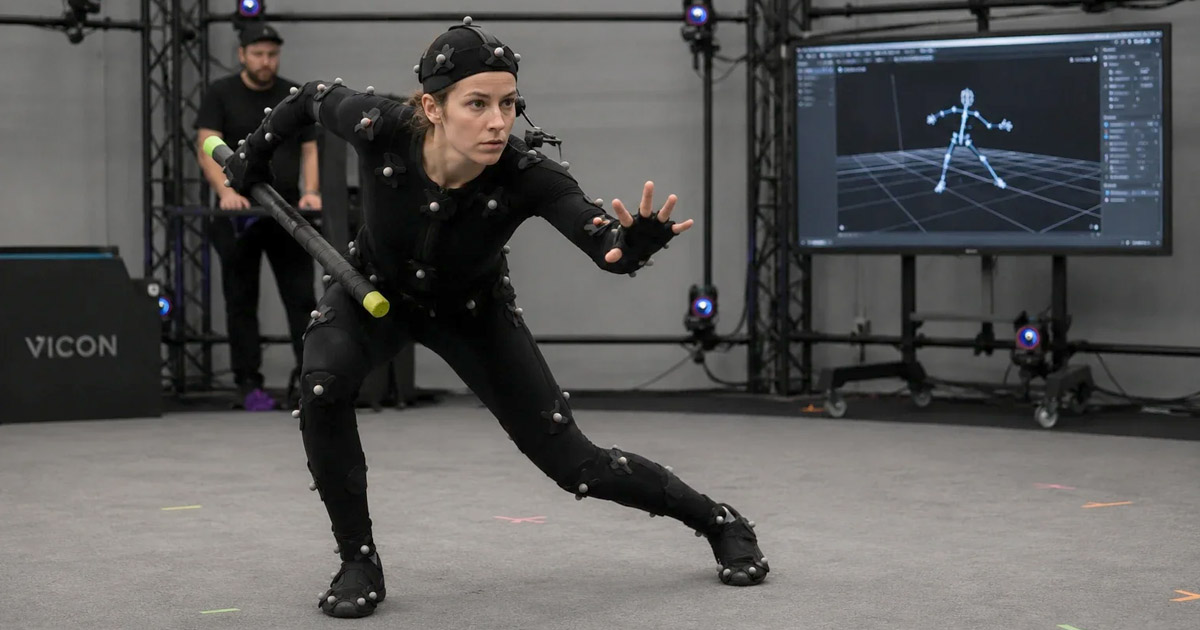
Motion capture (MoCap) records the movement of people, animals, objects, or performances and converts that information into data that can drive digital characters. In film, visual effects (VFX), animation, and games, it can preserve the timing, weight, and spontaneity of a live performance—then give artists the freedom to adapt that performance to a different character, environment, or shot.
Modern motion capture is no longer a single technique or a room full of cameras. It is a family of workflows that includes marker-based optical systems, wearable inertial sensors, markerless computer vision, facial performance capture, and AI-assisted tools that estimate motion from video. Each approach makes different trade-offs between fidelity, flexibility, setup time, cost, and the amount of cleanup required.
This guide explains how motion capture works, how its main technologies differ, where the data fits into a production pipeline, and what recent hardware and software developments mean for artists and studios.
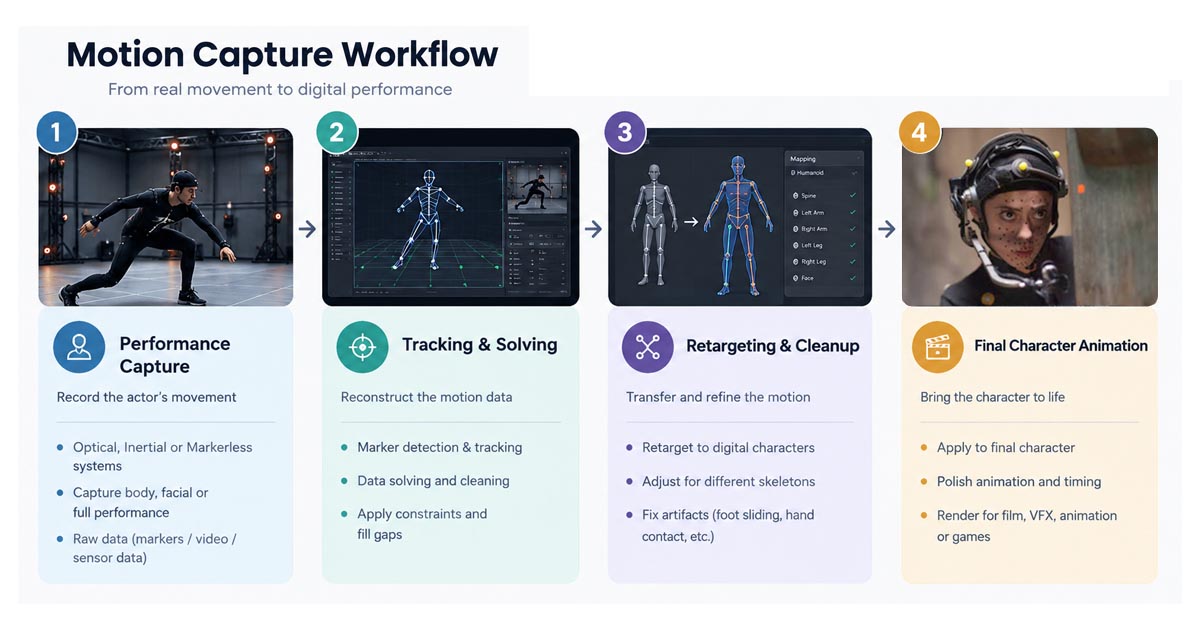 The motion capture pipeline transforms a recorded performance into refined animation for digital characters
What Is Motion Capture?
Motion capture is the process of measuring a real-world performance and translating it into digital motion data. Depending on the system, the data may describe the position of optical markers, the orientation of body segments, tracked facial features, or a solved skeletal performance. The data can then drive a digital character, support animation, or be used for analysis and simulation.
Motion capture is often abbreviated to MoCap. It is important, however, to distinguish capturing a performance from finishing an animation. A capture system records or estimates movement; it does not automatically guarantee that the resulting animation will fit a character, communicate the intended emotion, respect physical contact, or meet the needs of a final shot.
Motion Capture, Performance Capture, and Rotoscoping
- Motion Capture: A broad term for recording or estimating movement and turning it into data. In entertainment, it most commonly refers to body motion, but it can also include hands, face, props, and other moving subjects.
- Performance Capture: A production term that emphasizes the actor’s broader performance rather than body movement alone. Depending on the production, it may combine body motion, facial performance, voice, and other performance information. The exact scope varies by pipeline.
- Facial Motion Capture: A focused workflow for recording or estimating facial movement and expressions. It may use head-mounted cameras, facial markers, multi-camera systems, or markerless video analysis.
- Rotoscoping: An animation technique in which artists trace or use live-action footage as a visual reference. It is historically related to the broader effort to reproduce observed movement, but it is not the same as modern 3D motion capture, which produces motion data through tracking, sensing, or computational estimation.
These methods can complement one another. A production may use motion capture for the body, a separate facial workflow for expressions, live-action footage as reference, and hand animation to refine the final performance.
A Brief History of Motion Capture
The history of motion capture is best understood as a series of related developments rather than a single invention. In the late nineteenth and early twentieth centuries, photographic studies of human and animal movement helped researchers and artists examine motion frame by frame. Rotoscoping later gave animators a practical way to use filmed performances as drawing reference. Neither approach was identical to today’s digital MoCap, but both helped establish the idea that observed movement could inform animation.
During the second half of the twentieth century, advances in computing, camera technology, biomechanics, and real-time measurement made it increasingly practical to record movement as numerical data. Optical tracking systems evolved from research applications into tools used in animation, visual effects, games, and performance analysis. As digital characters became more prominent, studios developed workflows for transferring recorded performances to CG skeletons and facial rigs.
In the 2000s and 2010s, motion capture became more visible in large-scale digital-character productions and performance-driven games. At the same time, inertial suits made capture more portable, facial systems became more sophisticated, and game engines enabled captured performances to be visualized in Realtime. More recently, markerless computer vision and AI-assisted video-to-motion tools have lowered the barrier to experimentation and previs.
The key change is not that one new technique has replaced all earlier systems. Instead, productions now have a broader set of tools and can combine them: markerless capture for rapid exploration, inertial systems for location work, and high-end optical capture where a project requires tightly controlled tracking and detailed performance data.
How Motion Capture Works
The exact process depends on the technology, but a production-ready workflow usually includes preparation, capture, solving, validation, retargeting, and refinement.
- Define the performance requirements. Establish what must be captured: full-body movement, hand gestures, facial expressions, interactions with props, multiple performers, or a combination of these.
- Prepare and calibrate the system. Optical systems require camera placement, calibration, and suitable marker visibility. Inertial systems require correct sensor placement and calibration. Markerless systems depend on camera coverage, image quality, and a suitable capture setup.
- Record the performance. The system tracks markers, measures sensor orientation, or estimates body and facial landmarks from images. Some systems provide a live preview, while others process footage after recording.
- Solve and inspect the data. Software converts the observations into a usable representation of movement, such as a 3D skeleton or a set of animation controls. The team checks for missing data, jitter, incorrect labels, drift, or implausible poses.
- Retarget the motion. The captured performance is mapped to the target character’s skeleton or rig. Differences in proportions, joint placement, orientation, and rig design can require adjustments.
- Clean up and refine. Animators and technical artists correct foot sliding, contact errors, unwanted jitter, intersections, timing issues, and movements that do not suit the character or shot.
- Integrate and review. The result is sent to the target DCC application or game engine, reviewed in context, and revised as needed before final delivery.
These stages are not always separate or strictly linear. Real-time pipelines may combine capture, solving, and visualization, while offline productions may perform substantial cleanup after the session.
Main Motion Capture Technologies
Optical Motion Capture
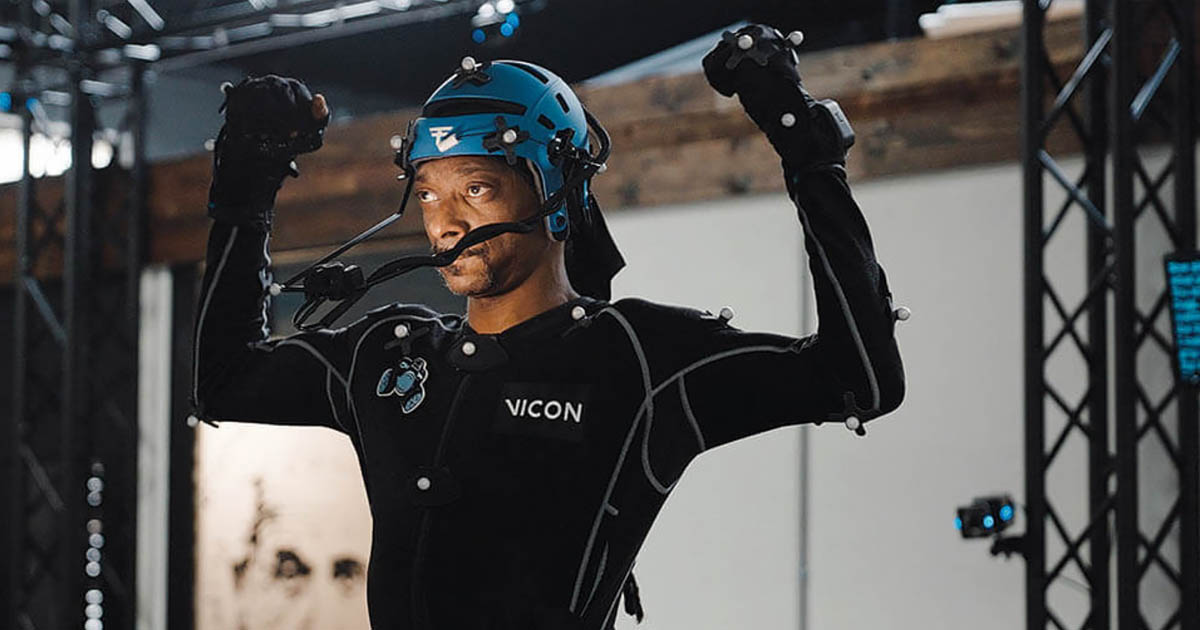
Optical systems use cameras to observe markers or other trackable features and reconstruct their movement in 3D. In common marker-based entertainment workflows, performers wear suits with reflective markers. Multiple cameras observe the markers from different angles, and specialized software identifies them, reconstructs their 3D positions, and solves the movement.
Optical capture is widely used when a production needs controlled, repeatable data, multiple performers, prop tracking, or a pipeline that supports detailed review and cleanup. Professional systems can support high-quality capture, but results depend on camera coverage, calibration, marker placement, the capture volume, and the complexity of the action.
Strengths
- Strong fit for controlled studio capture and repeatable production workflows.
- Can support multiple performers and tracked props when the system and setup are designed for them.
- Integrates with established pipelines for solving, data cleaning, and animation export.
Limitations
- Requires careful setup, calibration, and adequate camera visibility.
- Occlusion can make markers difficult to identify when limbs overlap or performers interact closely.
- Equipment, stage space, and specialist operation can make a high-end system costly to establish and run.
Optical capture should not be described as universally dependent on ordinary visible-light conditions. Many professional marker-based systems use infrared cameras and reflective markers, so their behavior differs from a conventional video camera recording a dark room.
Inertial Motion Capture
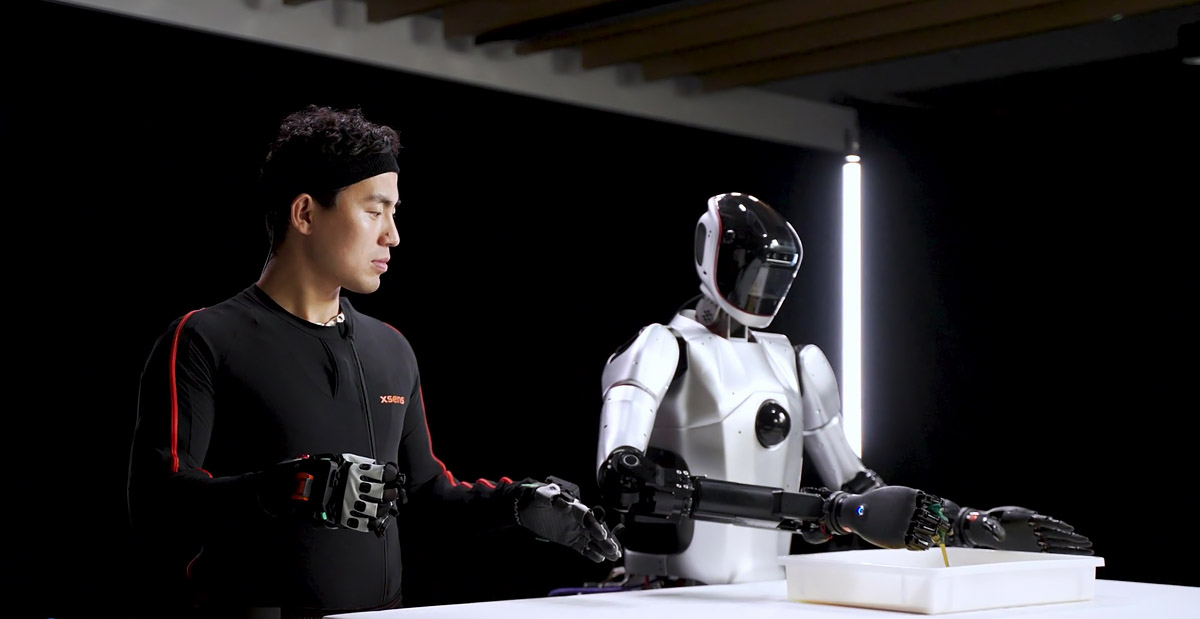
Inertial systems use wearable sensors—typically including gyroscopes and accelerometers—to estimate the orientation and movement of body segments. The sensors are fitted to a suit or wearable setup, and software combines their measurements into a skeletal performance.
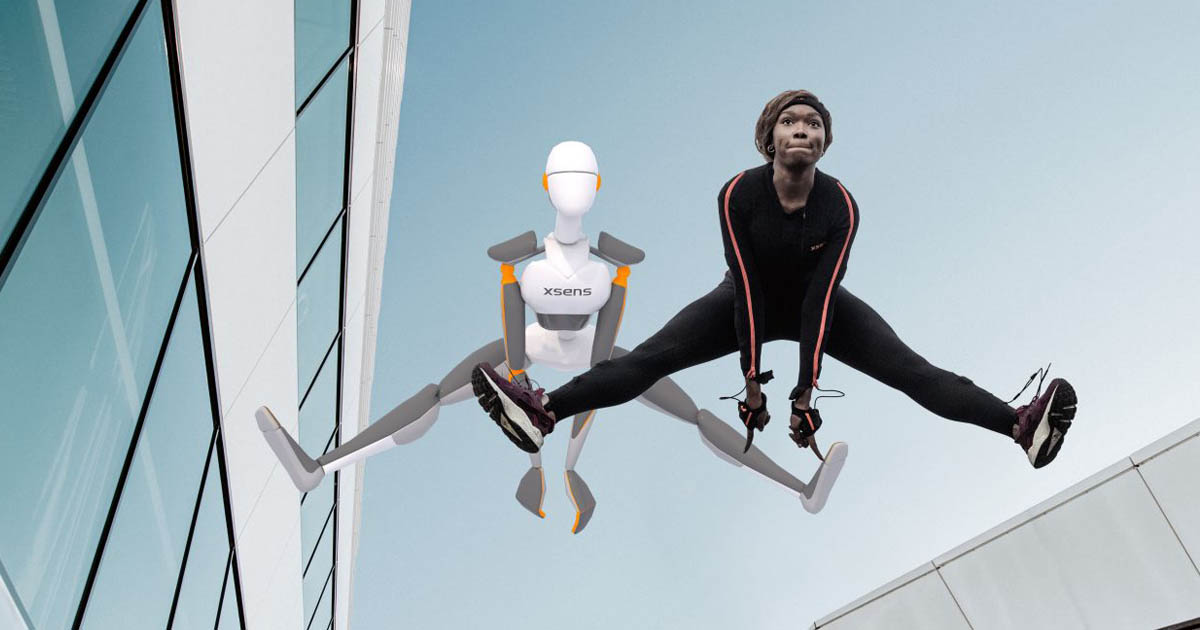
Because an inertial suit does not rely on a room full of optical cameras, it can be useful for location work, large spaces, outdoor recording, or situations where a traditional optical volume is impractical. It can also support rapid setup and movement across different environments.
Strengths
- Portable and suitable for many on-location capture scenarios.
- Does not depend on optical markers remaining visible to multiple cameras.
- Can stream motion to compatible software or game engines for live visualization.
Limitations
- Sensor orientation and calibration affect the quality of the result.
- Some systems may accumulate drift or need additional constraints to maintain reliable position estimates.
- Foot contact, interaction with props, and precise spatial relationships may need additional processing or reference data.
Inertial capture is not simply a lower-accuracy version of optical capture. The two systems measure movement differently and suit different production conditions. The correct choice depends on the required data, environment, and cleanup budget.
Markerless Motion Capture
Markerless systems estimate movement from image or video data without requiring performers to wear tracking markers. Computer vision and machine-learning methods detect body features, track them across frames, and infer a 3D pose or skeletal motion. Some systems use multiple synchronized cameras; others are designed to estimate motion from a single video view.
Markerless workflows can reduce preparation time and make it easier for directors, animators, and performers to test ideas quickly. They are especially useful for previs, blocking, rapid iteration, reference capture, and some production tasks where the required fidelity matches the system’s capabilities.
Markerless is not a single quality level. A purpose-built multi-camera system for professional entertainment capture differs significantly from an online tool that estimates a skeleton from a phone video. Camera count, resolution, frame rate, calibration, occlusion, clothing, and the solver all affect the result.
Strengths
- Can reduce or eliminate the need for suits and physical markers.
- Enables faster experimentation and easier capture in everyday clothing.
- Can help creative teams evaluate movement before committing to a more elaborate shoot.
Limitations
- Occlusion, unusual poses, loose clothing, fast motion, and interactions between performers can confuse pose estimation.
- Single-camera footage provides less direct depth information than a well-calibrated multi-camera setup, so 3D motion must be inferred.
- Hands, fingers, subtle contact, and precise prop interaction may need separate capture or manual correction.
AI-Assisted Video-to-Motion and Text-to-Motion
A related but distinct development is the use of AI to generate or estimate motion from ordinary video, prompts, or other inputs. Video-to-motion tools analyze footage and produce a skeletal animation that can be edited and retargeted. Text-to-motion systems generate a plausible movement from a written description.
These tools can be useful for blocking, prototyping, background animation, quick tests, and creating a starting point for an animator. They should not automatically be treated as equivalent to a recorded performance from a calibrated professional capture system. A generated movement may be plausible without matching the exact timing, contact, intent, or physical details of a particular actor.
In production, the most useful question is not whether AI can generate motion, but whether the resulting motion meets the shot’s requirements and how much time is needed to validate and refine it.
Body, Facial, and Performance Capture
Body Motion Capture
Body capture records movement of the torso, arms, legs, and head. The output may be a solved skeleton or another motion representation that can drive a character rig. The capture system does not need to record every final deformation: facial rig behavior, cloth, muscle simulation, and secondary motion may be handled elsewhere in the pipeline.
Facial Motion Capture
Facial capture records or estimates expressions and facial movement. Depending on the workflow, it may use markers, head-mounted cameras, multi-camera rigs, or markerless video. The resulting data is mapped to the target character’s facial rig, blendshapes, or other deformation system.
Facial capture is particularly sensitive to the design of the target face. Human facial movement does not map identically to every digital character, and the final result may need adjustments to preserve speech clarity, emotional intent, eye direction, and the character’s design.
Performance Capture
Performance Capture describes a broader performance-oriented workflow that may combine body movement, facial animation, voice, and other acting information. Some productions record these elements simultaneously; others capture them in separate passes and synchronize them later. The term does not imply that every aspect of a performance is captured by one device or in one session.
Stunt Performers and Digital Characters
Stunt performers can provide movement reference or recorded motion for digital characters, including falls, combat, acrobatics, and other physically demanding actions. Motion capture does not replace stunt expertise: the performer’s safety, choreography, contact with props, and the requirements of the digital character all affect the session. For dangerous actions, capture planning and safety supervision remain essential.
From Raw Data to a Finished Character Performance
Captured data is a starting point, not automatically final animation. Several technical and artistic steps determine whether it works in the final shot.
Solving and Data Cleanup
Solving converts observations—such as marker trajectories or sensor measurements—into a coherent motion representation. Cleanup addresses gaps, mislabeled markers, jitter, drift, implausible joint movement, and other artifacts. Automated tools can accelerate this work, but difficult shots often require experienced operators and manual review.
Retargeting
Retargeting transfers motion from the captured performer or source skeleton to a target character. A human actor and a stylized creature may have very different proportions, joint positions, limb lengths, or rig controls. Retargeting therefore requires more than copying joint values: the system must preserve the intention of the movement while adapting it to the target rig.
Contact, Foot Sliding, and Props
Common issues include feet sliding across the floor, hands missing a handle, limbs passing through a body, or a character failing to maintain contact with another performer. These errors can result from capture limitations, differences between the actor and character, retargeting, or the target scene’s timing and geometry.
Correcting them may involve contact constraints, trajectory editing, animation layers, physics-aware tools, or hand-keyed adjustments. A visually convincing result often depends on the animator’s ability to preserve the performance while making it work in the scene.
Why Hand Animation Still Matters
Motion capture excels at preserving the nuances of a recorded performance, but not every movement is best solved through capture. Highly stylized actions, impossible poses, exaggerated timing, non-human anatomy, and gameplay transitions may benefit from keyframe animation or a hybrid workflow. Professional pipelines frequently combine captured motion with animator-authored changes.
Motion Capture Software and Production Pipelines
Motion capture software serves different purposes across the pipeline. Some applications manage cameras and solve marker data; others process inertial measurements, edit motion, retarget characters, or receive live animation streams inside a game engine. These tools should be evaluated by their role rather than treated as interchangeable products.
- Vicon Shōgun: A professional software environment for optical motion capture, with markerless options available through Vicon’s Shōgun Markerless workflow. Vicon describes integration between markerless and optical capture, allowing teams to move from rapid creative iteration to more controlled capture when needed.
- Xsens Animate: A workflow for working with motion captured by Xsens inertial systems. Xsens Link’s next-generation system, announced in November 2025, supports real-time streaming to Xsens Animate and compatible third-party tools, including Unreal Engine and Blender.
- Autodesk MotionBuilder: A character-animation application commonly used in motion-data review, editing, retargeting, and performance workflows. Its usefulness depends on the studio’s pipeline and the applications that exchange data with it.
- Unreal Engine and MetaHuman Animator: Unreal Engine can receive and visualize animation data in Realtime. In Unreal Engine 5.8, released in June 2026, Epic introduced a markerless MetaHuman Animator workflow that can capture face, body, or both from a single off-actor camera; Epic identifies the associated plugin as Experimental.
- Rokoko Create: A motion-creation platform that brings AI-powered video-to-motion and text-to-motion workflows together. Rokoko announced that Vision would become part of Create from July 16, 2026, with legacy dual-camera and online webcam capture features scheduled for retirement on August 16, 2026.
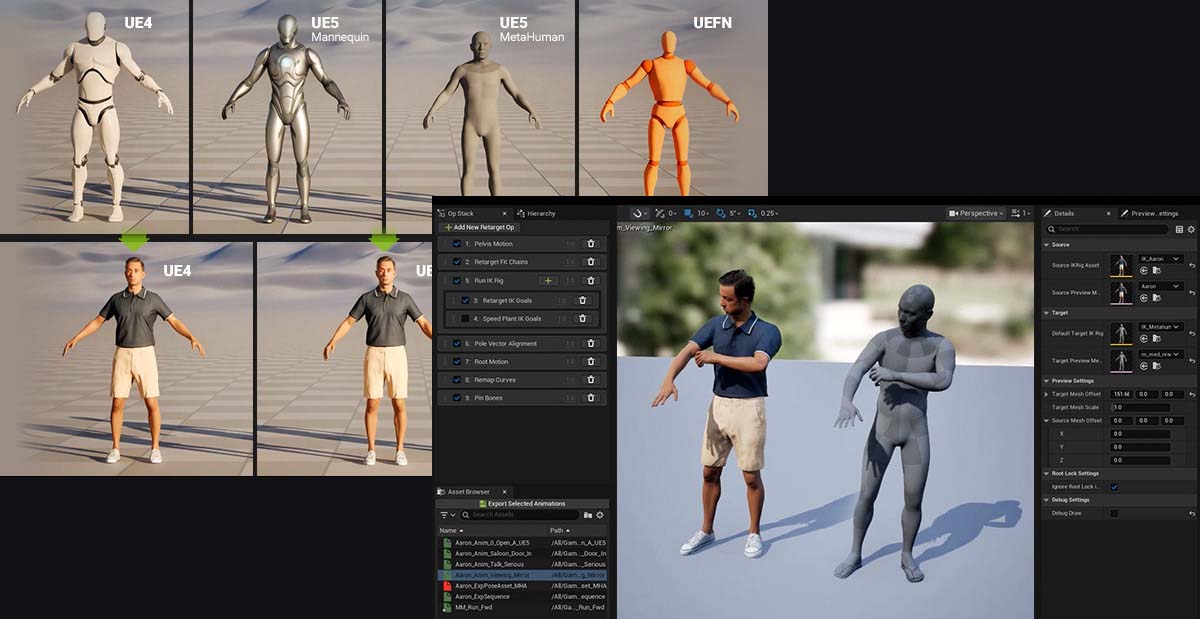
These examples illustrate the range of current workflows, not a universal software stack. A studio may use one vendor’s capture hardware, another application for solving or editing, a DCC package for character work, and a game engine for Realtime review. Before choosing a tool, verify supported file formats, skeleton conventions, streaming options, licensing, and compatibility with the rest of the pipeline.
Recent Advances in Motion Capture
Markerless Capture Is Moving Beyond Simple Reference Tools
Markerless technology is expanding from lightweight pose estimation toward more integrated entertainment workflows. In March 2025, Vicon announced the general availability of its markerless solution for VFX, built around Vanguard cameras and Shōgun Markerless and Shōgun Post software. Vicon describes workflows for rapid iteration, real-time visualization, prop integration, and connection with existing optical systems.
The production significance is the ability to test blocking and performance ideas earlier, then move to a more controlled optical workflow when a shot demands it. This is better understood as a complementary pipeline than as proof that marker-based capture is obsolete.
Wearable Systems Are Improving Connectivity and Practicality
On November 12, 2025, Xsens announced a redesigned generation of Xsens Link. The company highlighted sensor updates, improved suit comfort, integrated washable cabling, hot-swappable batteries, and Wi-Fi 6E connectivity, along with streaming support for Xsens Animate and compatible third-party applications.
These changes matter because a capture system’s usefulness depends on more than sensor specifications. Setup time, performer comfort, reliable connectivity, battery changes, and the ability to move data into the production’s tools all affect the efficiency of a session.
AI Is Expanding Access to Motion Creation
AI-assisted tools are making it easier to create a first-pass animation from video or text. Rokoko’s 2026 transition of Vision into Create is one example of a broader move toward integrated motion-creation platforms. Such tools can reduce the effort required to generate a starting point, especially for previs and independent creators.
The limitation is that a generated skeleton is not automatically a production-ready performance. Teams still need to check timing, contacts, feet, hands, body proportions, and retargeting behavior. For demanding hero shots, the cost of review and correction can matter as much as the speed of initial generation.
Capture Is Becoming More Closely Connected to Realtime Production
Unreal Engine’s June 2026 release of version 5.8 included an Experimental markerless MetaHuman Animator plugin for full-body performance capture from a single off-actor camera. The ability to preview or generate character motion within a game-engine ecosystem can shorten the feedback loop between performance, digital-character setup, and scene review.
However, a feature being available in a game engine does not mean every studio can immediately use it for every production. Hardware and operating-system requirements, character compatibility, plugin maturity, capture conditions, and the needs of the target project must all be checked. Experimental features should be evaluated through tests before being relied on for critical delivery.
Motion Capture in Film, VFX, Animation, and Games
Film and Visual Effects
In film and VFX, motion capture can help drive digital characters, creatures, and digital doubles. The captured performance may be combined with live-action footage, CG environments, facial animation, simulation, and compositing. The main objective is not simply to reproduce the recorded movement, but to make the digital character feel present in the shot and consistent with the story.
Animation
In animation, capture can provide a natural movement base, reference for complex action, or a way to explore timing and blocking. Animators may preserve the recorded performance, stylize it, or use it as reference while building a new movement. The best choice depends on the visual style and whether the project values realism, exaggeration, graphic clarity, or a combination of these.
Video Games
Games use captured performances for cinematic sequences, character locomotion, combat, sports, and other animation libraries. Recorded motion may need to be segmented, blended, retargeted, and adapted to player input. Unlike a fixed film shot, gameplay animation must often transition between states and remain responsive under different conditions.
Virtual Production and Realtime Character Work
Motion capture can also feed Realtime character visualization and Virtual Production workflows. A live stream can let a director or animator see a digital character respond during a session, which can help with blocking and creative decisions. The final quality still depends on the capture system, character rig, retargeting, synchronization, and the rendering pipeline.
Choosing the Right Motion Capture Workflow
No single method is best for every project. Start with the required performance and delivery conditions, then choose the technology.
| Production need | Workflow to evaluate | Key consideration |
|---|---|---|
| High-control studio capture, multiple performers, or tracked props | Professional optical capture; consider hybrid markerless/optical setups | Camera coverage, occlusion, calibration, and cleanup resources |
| Portable capture or recording away from a dedicated volume | Inertial capture | Sensor calibration, spatial constraints, and contact correction |
| Fast blocking, previs, or early creative iteration | Markerless capture or video-to-motion | Required fidelity, camera setup, occlusion, and review time |
| Facial acting for a digital character | Dedicated facial capture or a supported markerless facial workflow | Target facial rig, eye behavior, lip sync, and performance nuance |
| Stylized motion or non-human character animation | Capture as a base, hybrid capture/keyframe animation, or hand animation | Character proportions, exaggeration, timing, and artistic intent |
Budget should include more than the capture equipment or software license. Consider stage or location costs, crew time, calibration, performer preparation, data processing, retargeting, cleanup, storage, and the cost of repeating a take if the data is unusable.
Limitations and Production Challenges
Motion capture can preserve details that are difficult to animate from scratch, but it also introduces technical and creative challenges:
- Occlusion and missing data: Body parts or markers may be hidden from cameras, while video-based systems may lose track of limbs during complex interactions.
- Retargeting artifacts: Different proportions and rigs can create foot sliding, joint distortion, or unwanted changes in the original performance.
- Physical contact: Gripping objects, leaning on surfaces, or interacting with another performer often requires careful review and correction.
- Facial nuance: Captured points or estimated expressions must be interpreted by the target rig; accurate tracking alone does not guarantee convincing acting.
- Data and pipeline compatibility: Skeleton definitions, coordinate systems, frame rates, naming conventions, and file formats must match the receiving application.
- Artistic fit: A physically accurate movement may not suit a stylized character, the camera framing, or the rhythm of a scene.
These challenges explain why skilled animators and technical artists remain essential. The value of capture is that it provides useful performance information—not that it removes the need for creative judgment.
The Future of Motion Capture
Motion capture is moving toward more flexible and interconnected workflows. Optical systems continue to serve demanding, controlled productions; inertial suits support portable capture; markerless systems reduce friction during creative exploration; and AI-assisted tools make motion generation accessible to more artists. Realtime engines are also making it easier to visualize captured performances in the context of digital characters and environments.
The likely direction is not a universal replacement of one method by another, but a more hybrid approach. A team may generate a first pass from video, refine a performance with a dedicated capture system, edit the result in an animation application, and review it in a game engine. The most appropriate combination will depend on the creative goal, the required fidelity, the schedule, and the cost of downstream correction.
For artists and studios, the most valuable skill is therefore not simply knowing how to record motion. It is understanding how to evaluate the data, select a suitable workflow, preserve the intention of the performance, and integrate the result into a complete production pipeline.
Frequently Asked Questions About Motion Capture
Does motion capture automatically produce finished animation?
No. The captured or estimated data usually needs solving, validation, retargeting, and cleanup. Contact, timing, facial behavior, and character-specific details may need additional animation work.
Is markerless motion capture always cheaper than optical capture?
Not necessarily. Markerless workflows can reduce equipment and preparation requirements, but cost depends on the system, number of cameras, processing needs, required fidelity, and time spent correcting the output. Professional markerless systems may still require dedicated hardware and trained operators.
Is inertial motion capture less accurate than optical motion capture?
There is no single answer for every system or task. Optical and inertial systems measure motion differently and have different failure modes. Compare them using the actual performance, environment, spatial requirements, and quality criteria of the project.
Can AI generate motion from an ordinary video?
Yes. Some AI-assisted tools estimate a skeletal performance from uploaded video. Results vary with camera angle, occlusion, image quality, movement complexity, and the solver. The output should be reviewed before use in a demanding production.
Can motion capture replace keyframe animation?
No. Capture and keyframe animation serve different purposes and are often combined. Capture is useful for preserving observed performance, while keyframe animation gives artists direct control over timing, posing, exaggeration, and stylization.
What software is used for motion capture?
It depends on the hardware and workflow. Examples include Vicon Shōgun for optical and supported markerless pipelines, Xsens Animate for inertial capture workflows, Autodesk MotionBuilder for motion editing and character workflows, Unreal Engine for Realtime visualization and MetaHuman workflows, and Rokoko Create for AI-assisted motion creation.


Sadjad Jahangiri 




Add comment