
UDIM (U-Dimension) is a system officially developed by Weta Digital in collaboration with Paul Debevec and his support team. Weta Digital, one of the pioneers in the global VFX industry, designed this system to address the complexities of UV mapping in large and intricate 3D projects. Initially, UDIM was developed for major cinematic and animated projects that required highly detailed and precise textures. Although Weta Digital
invented this technology, UDIM quickly became an industry standard for animation and texturing, and many 3D modeling and texturing software now support this system.
This system allows artists to use multiple UV Tiles (or segments) to manage textures. Each UV Tile represents a specific texture applied to a particular section of a 3D model. Essentially, UDIM is a numbering system for UV Tiles. Instead of mapping the entire model to a single texture (which usually has size limitations), artists can use multiple separate textures distributed across different areas of the model's UV map.
Further explanation: UDIM refers to a coordinate system for managing textures, enabling the use of multiple textures with varying dimensions on a single 3D model. This system is especially useful in the animation and video game industries to enhance efficiency and quality in texturing complex models. UDIM was invented by Paul Debevec and his team in Southern California at Weta Digital to solve issues related to UV mapping limitations and texturing in intricate 3D models.
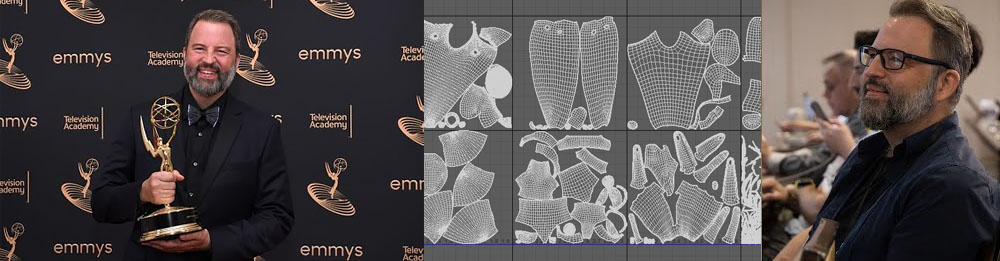
Below is a photo of Paul Debevec:
In the early 2000s, when more complex 3D projects such as high-detail films and video games were being produced, there was a growing need for a more efficient method of applying textures to models. Previous methods for managing textures, especially on large and complex models, faced challenges such as texture size limitations and complexity in UV mapping. UDIM was introduced as a solution that allows artists to define textures separately for each section of complex models (and sometimes for each part of organic models). This system can easily manage multiple textures with high detail using a numbering scheme across 3D models. Therefore, UDIM was initially developed by Paul Debevec at Weta Digital as a solution for complex animation and film projects and later became an industry standard in 3D production.
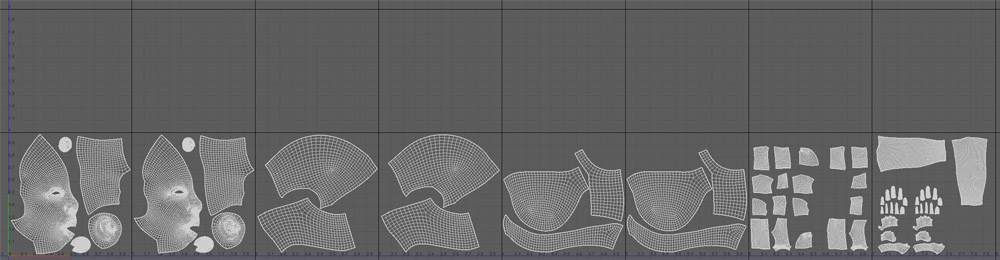
The UDIM system helps designers and artists place textures more logically and efficiently across different areas of 3D models. In 3D modeling, UV mapping (which represents a 3D object's surface in 2D) is usually used to apply textures to models. In traditional methods, these maps might be limited to a single texture, which can reduce quality or limit detail. UDIM solves this problem by allowing artists to use multiple textures placed in a mosaic pattern. Each texture occupies a specific "tile" or block that is identified using a unique number.
Explanation of technical terms:
-
U-Dimension: Refers to the horizontal dimension of patches in the UDIM system. Each patch or section of the texture is assigned a unique number.
-
UDIM patches: In UDIM, each texture is divided into multiple patches arranged as a grid of cells.
-
Maximum U index of 10: The U index can range from 0 to 10 in a horizontal row of patches.
-
Virtually unlimited V index: The V index runs vertically for each patch, and in the UDIM format, it is virtually unlimited. In other words, you can have an unlimited number of vertical patches in a single column.
Key Features of UDIM:
Segmenting the model into different parts: With UDIM, different sections of complex models can be textured separately—for example, one part of the model for the face, another part for clothing, etc.
Better performance with large textures: The UDIM system allows the use of very large, high-quality textures, as it removes the limitations that exist with single, unified textures.
High scalability: For large and complex models that require many textures, UDIM allows textures to be managed separately and efficiently.
Further details:
UV Mapping and UDIM tools: In UV mapping, a 2D coordinate system (typically using the U and V axes) is used to assign textures to 3D models. These coordinates determine how points on a 3D model are "mapped" onto 2D textures. The UDIM system expands this mapping and allows the use of multiple textures for a single model. Instead of using a single unified texture, a series of textures is used across different UV tiles.
Texture segmentation: In the UDIM system, a series of coordinate numbers are defined, each corresponding to a specific section of the texture. These numbers form a grid, with each number assigned to a particular part of the 3D model. For example, UDIM numbers might be: 1001, 1002, 1003, etc., with each number representing a separate texture.
Advantages:
-
Reduced limitations: Using UDIM allows the use of larger and higher-resolution textures without facing restrictions like those in traditional UV mapping tools.
-
Increased flexibility: You can texture different sections of complex models (such as a character's body, face, or clothing) separately and at different resolutions.
-
Improved workflow in 3D software: In software such as ZBrush, Maya, or Substance Painter, UDIM allows users to manage textures more efficiently and quickly.
How it’s used in software: In programs like ZBrush or Substance Painter, artists can easily divide textures across multiple UV tiles, each assigned a UDIM number. This segmentation allows a separate texture to be applied to each section of the model without altering the model’s original UV mapping.
In fact, UDIM is a powerful method for managing textures that enables artists and designers to texture complex 3D models accurately and with high quality. This system is particularly useful for large, complex projects with multiple models and high levels of detail.

The Concept of UV Tile in UDIM
In the context of UDIM, the concept of a UV Tile refers to separate sections of the UV mapping that are each assigned to a specific texture. Simply put, a UV Tile is a portion of the UV space that can independently receive its own texture, separate from other tiles.
UV Mapping: This is the process in which 2D coordinates (U and V) are assigned to the surface of a 3D model, allowing 2D textures to be applied onto the 3D surface. In traditional UV mapping, usually a single unified texture is used for the entire model surface, which must adhere to specific size limitations.
UV Tile in UDIM: In UDIM, the UV space is divided into sections called UV Tiles. Each UV Tile is a portion of the UV map with its own coordinates and is typically assigned a separate texture. This allows different textures to be applied to different areas of the model without restricting the entire model to a single texture.
How UV Tiles are numbered: In the UDIM system, UV Tiles are numbered so that each number corresponds to a specific section of the model. Numbering typically starts at 1001 and continues sequentially. For example:
-
1001: First UV Tile
-
1002: Second UV Tile
-
1003: Third UV Tile
-
…and so on
These numbers make it easy to link textures to different parts of the model, allowing each UV Tile to be managed independently from the others.
Advantages of UV Tiles:
-
Better texture management: Using UV Tiles, different textures of varying sizes can be applied to different parts of a model. This system allows artists to texture complex models with higher quality.
-
High performance: By segmenting the model into separate sections, larger and higher-resolution textures can be used without limiting the entire model to a single texture.
-
Increased flexibility: You can assign separate textures to different parts of a model, such as the face, body, clothing, etc., allowing textures to be applied more precisely and with greater detail.
In the UDIM system, a UV Tile refers to a distinct and manageable section of the UV mapping that is assigned its own texture. This system enables 3D artists to texture complex models using multiple high-quality textures without the constraints of a single unified texture.
Below, we will explain some applications of UDIM in various fields:

Applications in Film and Animation:
UDIM is an advanced technique in 3D texturing, especially used for creating complex and realistic models. This system allows artists to apply various textures more precisely and efficiently to 3D models. Here’s how UDIM is applied in film and animation production:
Increased Accuracy and Detail in Textures:
In 3D films and animations, achieving high realism requires complex models with precise textures. Instead of using a single texture for the entire model, the UDIM system allows each part of the model to be covered with separate textures. This means that more details can be applied to each section of the model (such as skin, clothing, or other surfaces), resulting in higher fidelity.
Better Management of Complex Textures:
In film and animation productions, which often involve highly detailed models with multiple surfaces, UDIM enables artists to organize different textures systematically. Each texture can be assigned separately using UDIM numbering formats (e.g., 1001, 1002, 1003) for different model sections. This segmentation simplifies and speeds up the workflow, as each texture can be modified and improved independently.
Creating Realistic Models:
Realism is a key feature in cinematic and animated productions. Using UDIM, artists can add extremely high detail to different areas of 3D models. This is especially useful for natural parts such as human skin, intricate clothing textures, or various material surfaces like wood and stone. Each part of the model can be textured with its own precise and unique details.
Improved Rendering Performance and Efficiency:
Another advantage of using UDIM in film and animation is enhanced rendering efficiency. When textures are divided into separate sections, each can be rendered individually, optimizing hardware resources. This segmentation helps reduce render times and computational load, which is crucial in large projects with long and complex animations.
Ease of Editing and Updating Textures:
In animated films, textures often need continuous changes and improvements. With UDIM, artists can efficiently and quickly update textures for different parts of a model without having to rebuild the entire model from scratch. This feature is especially valuable in complex, high-detail productions that frequently require adjustments.
In summary, UDIM allows film and animation creators to build highly detailed 3D models while improving rendering performance and workflow efficiency. This technique plays a vital role in high-quality and realistic productions that require complex models and precise textures.
Applications in Video Games:
In the field of video games, using UDIM allows artists and developers to create 3D models with higher detail and quality for games without negatively impacting game performance. Here’s how UDIM is applied in video game production:
Increased Detail in 3D Models:
In video games, especially those requiring highly detailed and realistic graphics (such as AAA games), textures and 3D models must be precise and detailed. With the UDIM system, different parts of a 3D model can be covered with separate, more accurate textures. This enables developers to manage and apply details such as skin, clothing, or other parts of the model individually, without compromising the overall model quality.
Improved Performance and Efficiency:
In video games, particularly open-world or complex environments, performance is one of the main challenges. Using UDIM means that textures are divided into different sections, and only the necessary parts are loaded at any given time. This segmentation allows the game to utilize hardware resources more efficiently while maintaining high graphical quality. As a result, game developers can improve performance without sacrificing visual fidelity.
Better Texture Management in Large Projects:
Video games often include complex models with expansive environments and high detail. Managing textures in such projects can be challenging. UDIM allows artists to organize and handle different textures more efficiently. This segmentation lets them texture each part of the model individually and with higher quality, while keeping the overall management system simpler and more effective.
Use of High-Quality Textures for Realistic Graphics:
Games with realistic graphics, such as simulation or AAA titles, require high-resolution and highly detailed textures. UDIM helps designers create models with precise, high-quality textures that cover more details compared to traditional methods. This enhances realism in the game and provides players with a better visual experience.
Flexibility in Design and Editing:
In video games, continuous changes and updates to environments, models, and textures are often necessary. With UDIM, developers can edit individual textures separately and apply changes quickly. Therefore, if a minor adjustment is needed for a specific part of a model, there’s no need to re-edit the entire model or texture.
Optimized Use of Storage Space:
Games have limited storage space and require resource compression to prevent excessive data size. UDIM, by dividing textures into smaller and more manageable tiles, allows developers to optimize storage space. This is particularly important in open-world games and complex environments that require a large number of textures.
Support for More Detailed Animations:
In games that include complex animations such as facial expressions, skin movement, clothing, or other details, UDIM can help animate each part of the model with high detail. This makes animations appear more natural and precise, ultimately improving the quality of the gaming experience.

Applications in Industrial Design and Architecture:
In the fields of industrial design and architecture, using UDIM allows designers and architects to create more complex and detailed 3D models and apply high-detail textures to different parts of the models. Here’s how UDIM is applied in these two areas:
Increased Detail in 3D Models:
In industrial design and architecture, creating accurate and realistic models of components and buildings is crucial. With UDIM, designers can apply specific, high-detail textures to each part of the model. For example, in an architectural model, the building façade, windows, doors, and other surfaces can each have separate textures with their own details. This enables a more accurate representation of different materials such as wood, glass, concrete, and metal.
High-Accuracy Material Simulation:
In industrial design, one of the main goals of 3D modeling is to simulate materials and surfaces accurately. UDIM allows designers to create detailed textures for different materials on various parts of industrial models (such as machinery components, consumer products, or furniture). For instance, in a car model, different textures can be applied to the body paint, tires, glass, and interior, each designed separately with high precision.
Better Texture Management in Complex Projects:
In architectural and industrial design projects, which often involve complex models with many components, using UDIM provides better organization and management of textures. For example, in a multi-story architectural model with different sections, UDIM allows the designer to assign separate textures to each part of the building (windows, doors, walls, etc.) while managing them effectively and without interference.
Creating Realistic Environments for Architectural Visualization:
In architectural visualizations, especially for project presentations and renderings, creating accurate and realistic environments is essential. UDIM allows designers to apply high-resolution textures to each part of the environment (walls, floors, building exteriors, etc.), accurately simulating materials such as stone, brick, wood, and glass. This makes architectural models visually more accurate and realistic.
Optimized Rendering Performance:
In industrial and architectural projects, rendering complex, high-detail models can be time-consuming and resource-intensive. Using UDIM divides textures into sections, optimizing loading and rendering performance. Instead of loading a single large texture for the entire model, only the necessary sections are loaded, reducing render time and improving system efficiency.
Enhanced Editability and Updates:
Industrial and architectural designs often require continuous changes and precise updates. UDIM allows designers to edit and update textures for different parts of a model independently. This feature is especially useful for long-term or complex projects that may require frequent modifications over time.
Scalability in Large Projects:
In large architectural projects, such as urban design or extensive commercial and residential developments, models often include multiple buildings, public spaces, and various sections. Using UDIM, different textures can be applied independently to each part of the model. This segmentation allows work on large models to be done efficiently while adding more details at various levels.

Sadjad Jahangiri
![Verified]()