
AI is no longer just a separate tool for generating images or removing unwanted objects. In VFX, AI is gradually becoming part of the production workflow itself — working alongside Nuke, Maya, Blender, and a growing range of AI models and services.
But this raises an important question:
What happens when you have several different AI tools and want to turn them into a real VFX workflow?
This is where the idea of AI Orchestration — and platforms such as Griptape — becomes important.
For Nuke artists, the story is particularly interesting. In February 2026, Foundry completed its acquisition of Griptape, making it part of Foundry's broader direction for AI across professional creative workflows.
But what exactly is Griptape? Why did Foundry acquire it? And most importantly, what could this mean for VFX artists and Nuke users?
AI in VFX Is Moving From Separate Tools to Workflows
Today, an artist can use AI for many different tasks:
- Removing objects from a shot
- Creating masks
- Assisting with Roto
- Generating images
- Creating textures
- Upscaling images
- Cleaning up footage
- Analyzing shots
Each of these tasks may use a different AI model or tool.
The challenge begins when you want to combine several of them into a single production process.
Imagine a shot where an unwanted object needs to be removed. You might first need to identify the object, create a mask, run an AI process, and then bring the result into Nuke so the compositor can review and refine it.
At that point, having a powerful AI model is no longer the whole story.
How the different tools connect becomes just as important.
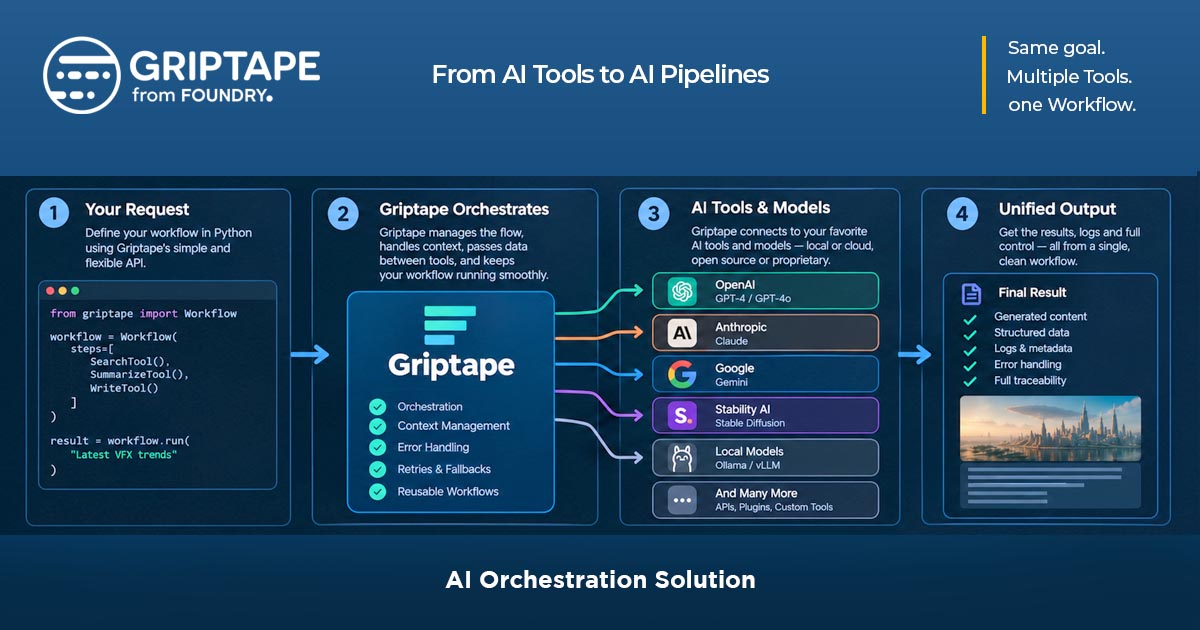
In simple terms, AI Orchestration means connecting different AI models, tools, and processes so they can work together as part of a defined workflow instead of operating as isolated applications. Foundry positions Griptape in this broader orchestration space.
What Is Griptape?
First, there is one important thing to understand:
Griptape is not an AI model.
You should not think of it as another image-generation or video-generation model. Instead, Griptape is designed to help build, connect, and coordinate AI workflows.
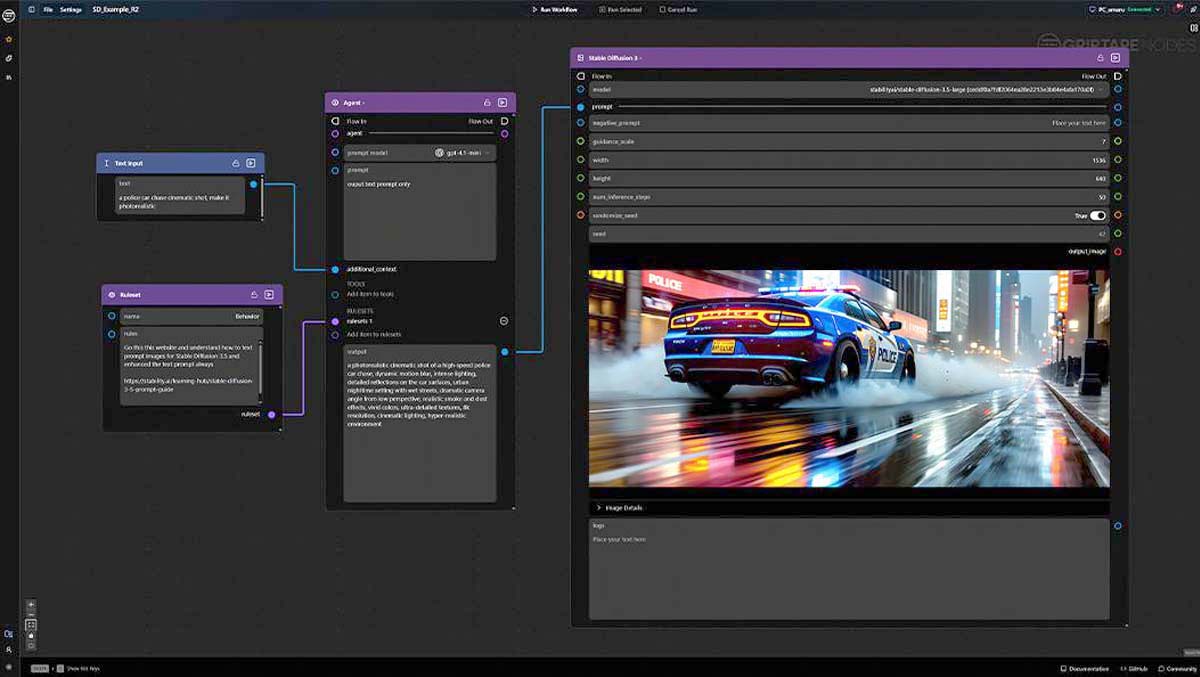
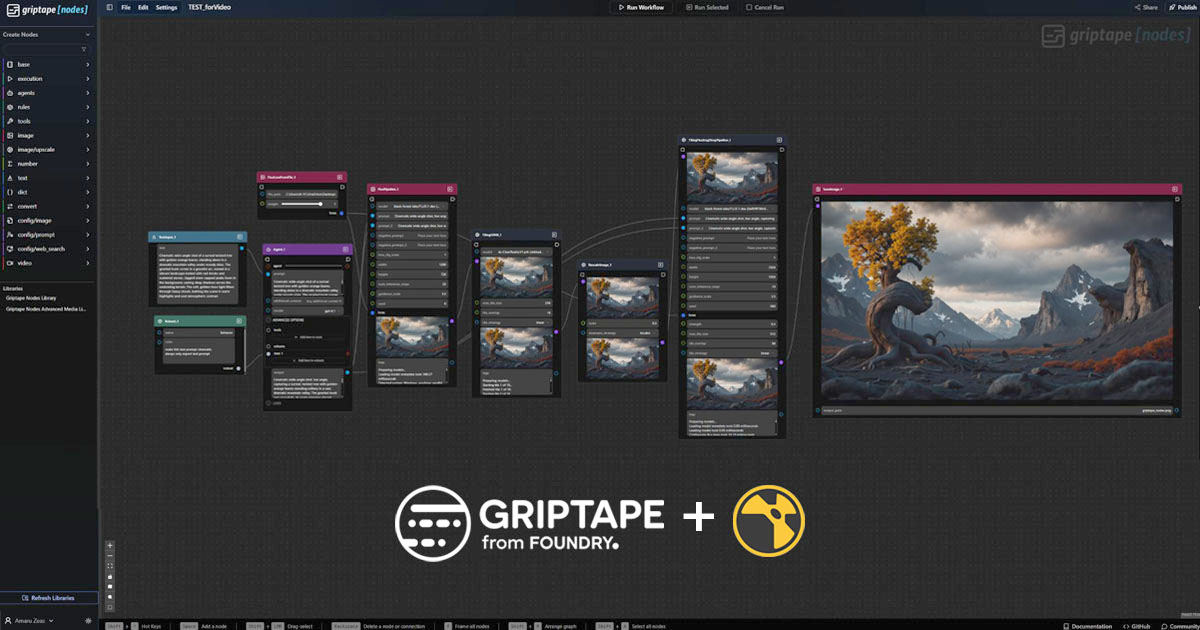
One of its key components is Griptape Nodes, a node-based environment where artists and technical users can connect different AI capabilities and models into workflows without having to build everything through code.
If you already work with nodes in Nuke or other VFX applications, the basic idea will feel familiar:
One node performs a task → its output goes to the next node → several nodes become a complete workflow.
The difference is that Griptape Nodes can connect those steps to different AI models and services.
Why Did Foundry Acquire Griptape?
Foundry announced the completion of its acquisition of Griptape on February 18, 2026.
The acquisition fits into Foundry's broader work in AI, which has already included technologies such as CopyCat in Nuke.
But Griptape approaches the problem from a different direction.
CopyCat is primarily focused on machine learning tasks inside Nuke, while Griptape can work across a much broader range of AI models, workflows, and production tools.
Foundry has described the acquisition as a way to expand AI capabilities and coordinate different models and Agents within professional workflows connected to Foundry's creative tools.
For a Nuke user, that means the acquisition is not simply about adding another AI feature to Nuke.
The bigger idea is this:
AI could become part of the production workflow surrounding Nuke and professional VFX.
Where Does Griptape Fit Into the Nuke Workflow?
This is where things become especially interesting for VFX artists.
Imagine that a TD or Pipeline Artist has built a more complex AI workflow.
It might contain several stages:
Input → Image Analysis → Mask Generation → AI Processing → Refinement → Output
The compositor does not necessarily need to see or manage all of that complexity.
The workflow can be packaged into a simpler tool that the artist can use inside Nuke.
The official Griptape documentation describes the ability to publish a workflow as a versioned `.gizmo` for Nuke. In other words, a workflow can become a reusable tool that can be used inside the Nuke environment.
This is particularly interesting for VFX production.
An artist can interact with a defined tool without necessarily needing to know how many AI models or processing stages are running behind it.
Practical Griptape Applications for VFX Artists
Let's move away from the theory and look at what this could actually mean for an artist.
Object Removal and Cleanup
One of the clearest applications is removing unwanted objects from a shot.
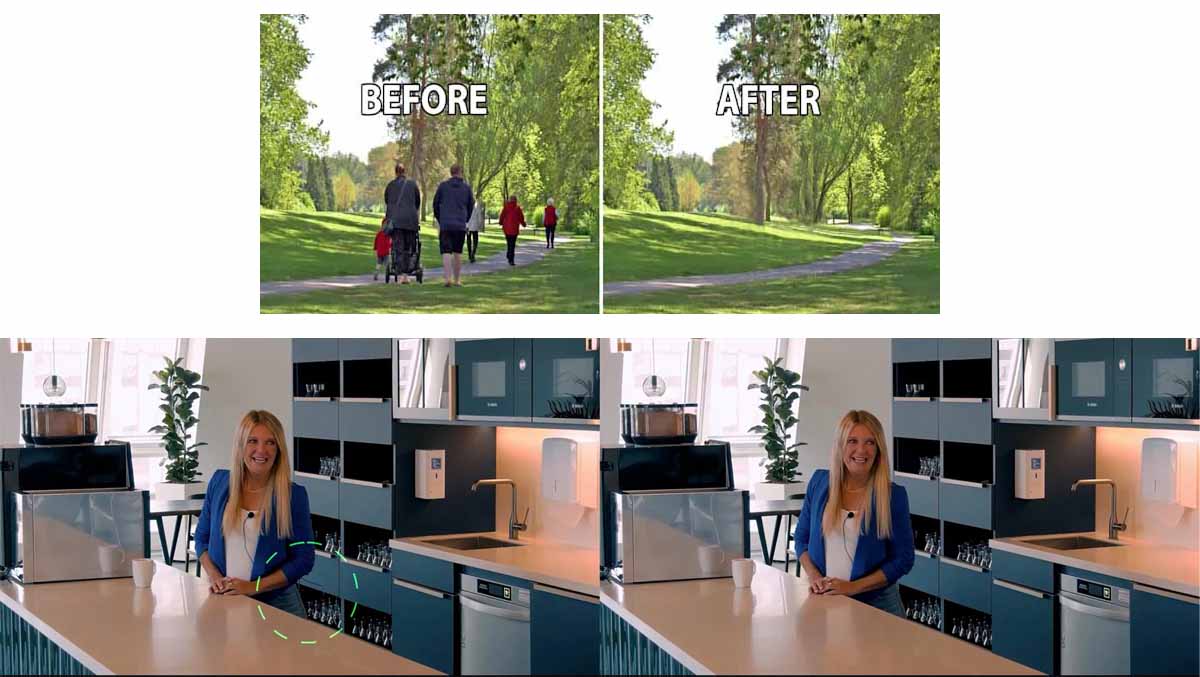
Imagine a shot containing an unwanted:
- Cable
- Piece of equipment
- Logo
- Person in the background
- Or another part of the environment that needs to be removed
Instead of handling every step manually and separately, an AI workflow could automate part of the process.
For example:
Plate → Object Detection → Mask → AI Cleanup → Output → Nuke
The artist can then review the result inside Nuke and make any necessary corrections.
And this final step is important:
AI generates the result; the artist decides whether the result is actually good enough.
Roto and Mask Generation
Roto can be one of the most time-consuming tasks in many shots.
AI can assist with identifying subjects, creating masks, or preparing an initial result that the artist can refine.
With Griptape, several of these steps can potentially be connected into a single workflow.
Instead of constantly moving between different tools, part of the process can become a reusable tool or workflow.
Image Generation
Image generation can also become one stage inside a larger production workflow.
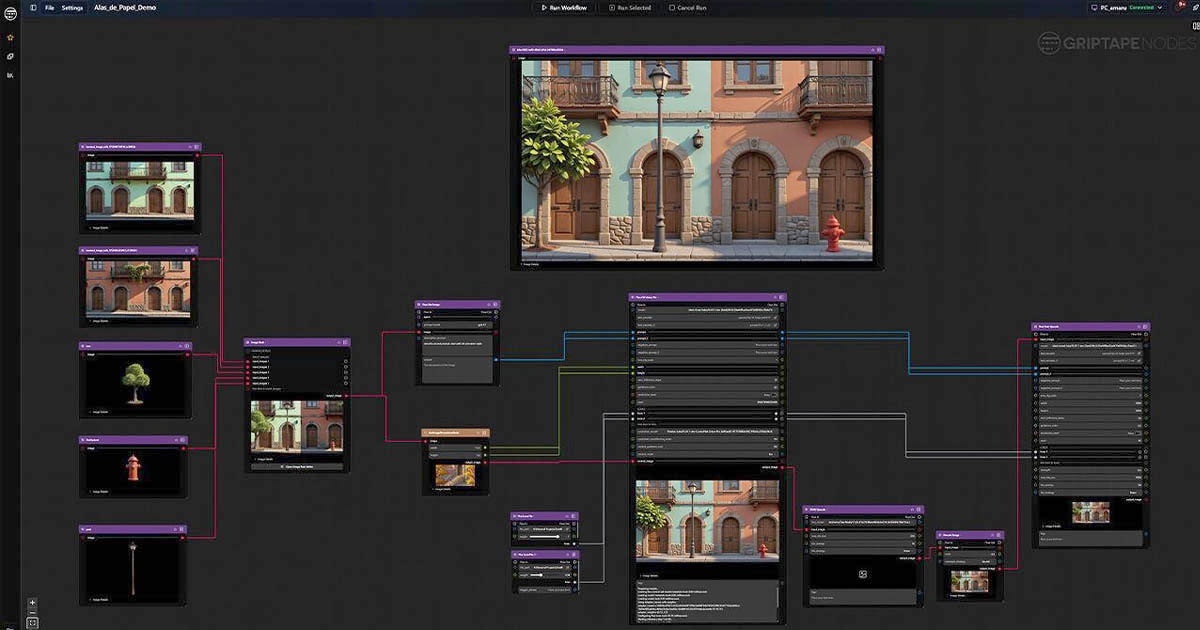
For example, a workflow could start with a reference image, process it, generate a new image, and prepare the result for another production step.
The important point is that Griptape itself does not have to be the image-generation model. It can connect the workflow to the appropriate model or service.
Texture and Material Creation
For CG and animation, AI-assisted texture creation and variation can be another interesting use case.
Imagine an artist starting with a reference image and needing to create a texture or several variations from it.
A workflow could combine generation, refinement, upscaling, and output preparation into a single process.
Upscaling and Image Processing
Upscaling can also become part of a larger workflow.
For example, an AI-generated result could be created first, then upscaled with another tool, and finally prepared for use in Nuke or another stage of production.
The advantage is that upscaling does not necessarily have to remain a completely separate step from the rest of the process.
Shot Analysis
AI is not only about generating images.
It can also be used to analyze visual content.
Future workflows could extract information from a shot, identify subjects, or generate useful information for later production stages.
This is where AI workflows become much more interesting than simply having a Generate button.
A Practical Example: From Plate to Cleanup in Nuke
Imagine a compositor has a shot where an unwanted object needs to be removed.
The workflow could look something like this:
Plate
↓
Object Detection
↓
Mask Generation
↓
AI Object Removal
↓
Nuke
↓
Artist Review & Cleanup
Several different technologies could be involved behind the scenes.
But the artist does not necessarily need to manage each one separately.
The idea behind Griptape is that these capabilities can be connected into a reusable workflow.
Instead of saying:
“I have several AI tools.”
You can think of it as:
“I have a workflow designed for this type of shot.”
That may sound like a small difference, but it can be a significant one in production.
Griptape and Gizmos in Nuke
If you work with Nuke, you are probably familiar with Gizmos.
In simple terms, a Gizmo is a reusable Nuke tool that can place part of a more complex process behind a practical interface.
Griptape can publish workflows as versioned Gizmos for Nuke. Its documentation also describes running an existing Nuke Script as part of a workflow, meaning Nuke itself can become one component inside a larger AI workflow.
For an artist, the experience could be very simple:
A new tool inside Nuke → a few controls → an AI-powered workflow.
There may be much more happening behind the scenes.
But the artist does not necessarily need to deal with all of that complexity.
And this is one of the important ideas behind professional AI workflows:
The complexity can stay behind the tool.
Griptape vs. ComfyUI
If you have worked with AI image or video generation, you have probably come across ComfyUI.
At first glance, Griptape and ComfyUI can look quite similar because both can use nodes to build AI workflows.
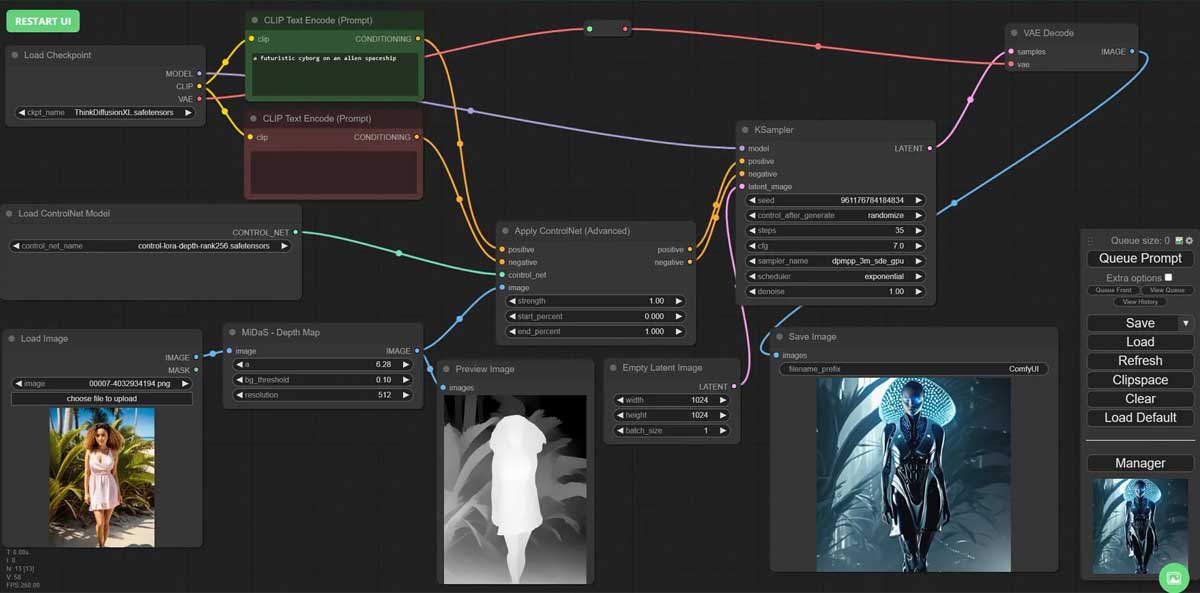
For an artist, however, it is more useful to think about their roles like this:
ComfyUI is a powerful environment for building and running AI workflows.
Griptape can operate at a broader orchestration level, connecting workflows, models, Agents, and production tools.
So the more useful question is not:
“Is Griptape better than ComfyUI?”
It is:
“Where does each one fit into the workflow?”
A workflow created with one AI tool could even become one component inside a larger production workflow.
For example, one part could run through ComfyUI while another stage happens in Nuke or another production application.
In that kind of setup, Griptape can act as the layer coordinating those different stages.
Griptape vs. CopyCat
This comparison is particularly relevant for Nuke users.
CopyCat is a machine learning technology in Nuke that can be used to create custom models for specific image-processing tasks.
Griptape addresses a broader problem.
If CopyCat is viewed as a specialized tool for creating an ML capability inside Nuke, Griptape is more focused on connecting and coordinating different AI capabilities across a larger workflow.
That means the two are not necessarily replacements for one another.
A studio could use a specialized ML model inside Nuke while also using Griptape to connect that workflow to other AI tools and production processes.
Is Griptape Only for Nuke?
No.
Nuke is especially important in the VFX context, but Griptape is not limited to Nuke.
Foundry currently describes connections between Griptape and tools such as Nuke, Maya, Blender, Katana and Mari as well as production management systems such as Flow Production Tracking.
In a larger production workflow, you could imagine something like:
- Shot information coming from a production management system
- An asset being processed in Maya or Blender
- An AI process being executed
- The result being sent to Nuke
- The artist reviewing the result
- A new version of the shot being recorded
This is where the idea of Orchestration becomes clear.
AI is no longer limited to a single application. It can potentially move between different parts of the production pipeline.
What Changes When AI Agents Enter the Workflow?
So far, we have mostly talked about workflows.
That means a predefined path:
Step 1 → Step 2 → Step 3 → Step 4
An AI Agent can introduce a different approach.
Instead of having every step completely predefined, an Agent can receive a goal and use the tools available to it to determine which actions are needed.
Imagine telling a system:
Prepare this shot for AI-assisted cleanup.
In a more advanced workflow, the system could inspect the shot, gather the required information, select the appropriate tools, and prepare the result for the next stage.
This does not necessarily mean that the artist disappears from the process. However, AI can automate some repetitive and execution-heavy tasks, reducing the amount of direct artist involvement required at certain stages.
In professional VFX, deciding whether a result works for the shot — visually, technically, and creatively — remains important. At the same time, the boundary between what AI performs and what the artist handles can shift depending on the project and the level of automation involved.
So What Does Griptape Actually Change?
One of the simplest ways to understand the idea is to look at three levels:
AI Tool:
Performs a specific task.
AI Workflow:
Connects several tasks into a sequence.
AI Orchestration:
Connects those workflows to a wider production environment, tools, and services.
That is why Griptape is more interesting when viewed as more than “another AI tool.”
Its real value becomes clearer when AI needs to become part of an actual production workflow.
The Future of VFX: When AI Becomes Part of the Workflow
One of the biggest changes in the coming years may not simply be that a new AI model generates slightly better images.
The bigger change could be how AI becomes part of an artist's everyday workflow.
Imagine a compositor no longer needing to switch between several applications for every small AI-assisted operation.
Inside Nuke, there could be a tool with several AI models and processing stages working behind a simple interface.
There could be one workflow for Cleanup, another for Roto, and another for Texture Generation.
Agents could even handle some of the preparation and execution steps.
From the artist's perspective, all of this could look very simple:
One tool → a few controls → a result.
Behind that simple interface, however, there could be an entire chain of AI models and workflows.
This is the point where AI moves from being an isolated feature to becoming part of the production workflow.
Conclusion
Griptape is not an AI model, and it is not intended to replace Nuke.
Its core idea is to connect different AI models, capabilities, and workflows with production tools and environments.
Foundry's acquisition of Griptape in February 2026 makes this especially relevant to the VFX industry, particularly because of its connection with Nuke and other tools used in professional production.
For artists, perhaps the most important part of the story is that AI does not necessarily have to remain a separate application that you open whenever you need one specific task.
It can become part of the same workflow you already use in Nuke and other VFX tools.
From Object Removal and Roto to Generation, Texture Creation, Upscaling, and Shot Analysis, AI capabilities can increasingly be packaged into reusable workflows that artists can actually use.
And this may be the most important idea behind Griptape and Foundry's approach to AI:
The future of AI in VFX is not only about more powerful models. It is about how those models become part of the real workflows artists use every day.
Frequently Asked Questions
What is Griptape?
Griptape is an AI orchestration platform designed to build and coordinate AI workflows and connect them with production tools and environments. Griptape Nodes provides a node-based interface for building AI workflows.
Is Griptape an AI model?
No. Griptape is not an AI model. It is designed to connect and coordinate different AI models, workflows, and capabilities.
How does Griptape work with Nuke?
Griptape Nodes includes a dedicated Nuke library and can publish workflows as versioned Gizmos for Nuke. It can also run Nuke Scripts as part of a larger workflow.
Does Griptape replace Nuke?
No. Nuke remains the compositing environment. Griptape can connect AI workflows with Nuke and other parts of a production pipeline.
What is the difference between Griptape and ComfyUI?
Both can use node-based workflows, but their focus is different. ComfyUI is widely used for building and running AI workflows, while Griptape focuses more broadly on orchestration and connecting workflows, models, Agents, and production tools.
What is the difference between Griptape and CopyCat?
CopyCat is designed for creating and using custom machine learning models for specific tasks inside Nuke. Griptape has a broader focus on coordinating different AI models, workflows, and production tools.
Is Griptape only for Nuke artists?
No. Foundry describes connections between Griptape and Nuke, Maya, Blender, and systems such as Flow Production Tracking. Its potential applications therefore extend beyond compositing.
Will Griptape replace VFX artists?
Griptape can automate and coordinate some execution-heavy and repetitive tasks, potentially reducing the amount of direct artist work required in certain projects. However, in professional production, evaluating the result, choosing the right approach, and making final creative and technical decisions remain important. The level of human involvement can vary depending on the project and the degree of automation.
 References & Further Reading

Sadjad Jahangiri 




Add comment