

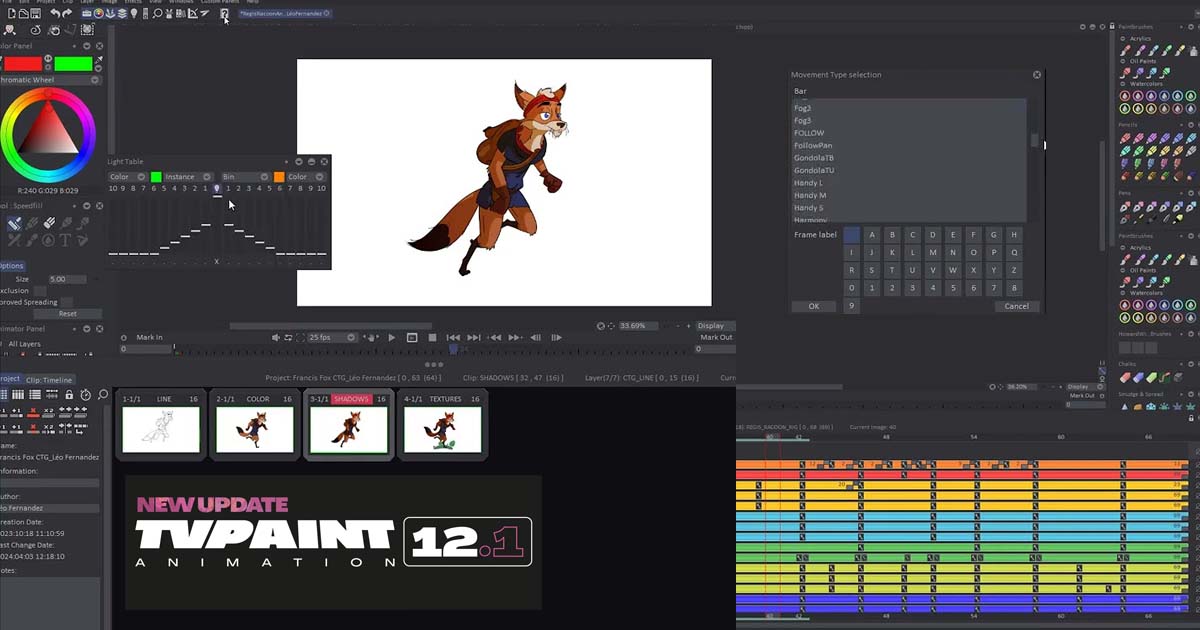
TVPaint has released TVPaint Animation 12.1.0, the first major update for the TVPaint Animation 12 generation. The release introduces a new Timesheet Panel and brings a wide range of improvements to the Timeline, Storyboard, Camera, Library, Rigging, Interface, Export, and other areas of the 2D animation workflow.
Rather than changing the fundamental approach of TVPaint, version 12.1.0 focuses on giving animators more control over production planning, timing, character rigs, shot organization, and media handling.
New Timesheet Panel
One of the headline additions in TVPaint Animation 12.1.0 is the new Timesheet Panel.
The Timesheet provides a dedicated environment for organizing animation timing and production information. It supports both Japanese and Occidental layouts, while allowing animators to work with memo information, audio track waveforms, dialogue notes, and camera-shot information.
Frames can also be assigned different roles, including Keyframes, Breakdowns, Inbetweens, and Special Inbetweens. This gives animators a clearer way to track the status and purpose of individual drawings throughout a shot.
Timesheets can be exported as PDF or XDTS, while XDTS data can also be imported into TVPaint to create or update a Timesheet.
Search Engine
The Search Engine has also been revamped to make finding production elements faster.
The updated Search Panel can search through Brushes, Custom Panels, Shortcuts, Clips, Layers, Library content, and Projects, allowing users to locate and select specific elements without manually navigating through every part of a project.
The Documentation button in the Main Panel has also been replaced with a search bar that provides direct access to the online documentation.
Updated SDK
TVPaint has also updated and revamped its SDK, providing developers and technical artists with a refreshed framework for extending and automating the software.
The update also adds new George commands related to Timesheets, layer roles, CTG palettes, project-state checking, and other operations.
Timeline Improvements
The Timeline receives several workflow improvements in version 12.1.0.
Layer Folders now support Pre and Post Behaviors, giving animators more control over how folder contents behave outside their defined animation range.
A new Loop function has also been added. Animators can select a range of frames and repeatedly play that section, which can be useful when refining movement, checking timing, or working through straight-ahead animation.
Other Timeline improvements include a new Fit to Mark In/Out zoom option, the ability to move an entire Folder within the Timeline, improved frame-count visibility, additional bookmark controls, and easier interaction with the current frame.
Storyboard Improvements
TVPaint 12.1.0 introduces Bridge Between Clips, a basic Onion Skin mode available from the Timeline view.
It allows animators to see the last frame of the previous Clip and the first frame of the next Clip at the same time. This can make it easier to check visual continuity and transitions between shots.
The Storyboard view also receives improvements to clip-duration editing and text entry in Action, Dialogue, and Notes fields.
Camera
The Camera system gains new types of Camera Key movements based on commonly used Japanese camera moves.
TVPaint also adds shortcut assignments for moving between Camera Keys, including Next Camera Key, Previous Camera Key, Go to First Camera Key, and Go to Last Camera Key.
These additions provide faster ways to navigate and refine camera animation directly from the Timeline.
Library
The Library gains support for storing sound files.
Sounds can now be imported from the Library directly into the Timeline, making frequently used audio assets easier to organize and reuse.
Library elements can also be sorted by creation date or alphabetical order, providing more flexibility when managing larger collections of production assets.
Rigging
The Rigging workflow receives several important additions.
Animators can now save and import a complete rig into the Library, including the character's bone structure and its dependencies. Animated rigs can also be stored and reused.
The Rigging Tool gains a Pose Selector with Preview, while Light Table support is now available for rigging layers. TVPaint also adds bone constraints, providing additional control over how rig elements interact.
Puppet Layers can be transformed or duplicated into Animation Layers, individual rig members can be scaled in both directions, and members can be added or removed even after a rig or animation has already been created.
Interface
Several interface improvements have also been introduced.
Users can now have up to three Color Panels open simultaneously, which can be useful when working with multiple color-related controls or different palettes.
Camera-view settings are now independent for each Project view, while several interface elements and HUD controls have also been adjusted for improved visibility and usability.
Apple ProRes Export
For production pipelines that rely on Apple ProRes, TVPaint Animation 12.1.0 introduces the official Apple ProRes export codecs on all three supported operating systems.
The new implementation replaces the previous FFmpeg-ProRes export for both TVPaint Animation and the TVPaint Converter.
TVPaint has also added the ability to export audio tracks from Clip: Display when they are loaded through Project View.
CTG Layers and FX Stack
The update also includes several improvements to CTG Layers and the FX Stack.
CTG Layer Presets now include Extract with AntiAliasing and Deactivate CTG Layer options. Meanwhile, FX Preview has been improved so that the preview can be applied across all layers.
General Improvements
Beyond the larger feature additions, TVPaint Animation 12.1.0 includes numerous smaller improvements across the application.
These include a new Transformation Preview Quality preference, additional controls for the Light Table and Transformation tools, the ability to apply Panning to multiple layers, improved shortcut customization, and new options for working with frame and time counts.
Panning, Zoom, and Rotation can now also be assigned to any keyboard key, rather than being restricted to the previous Alt-based setup.
The release also contains a substantial collection of fixes and stability improvements covering areas such as the Timeline, Project View, CTG Layers, Camera, interface, and other parts of the application.
Conclusion
With TVPaint Animation 12.1.0, TVPaint expands the production capabilities introduced with version 12 while retaining its established 2D animation workflow.
The new Timesheet Panel is one of the most significant additions, giving animators a dedicated system for organizing timing, dialogue, camera information, and animation roles. At the same time, improvements to Rigging, Timeline, Storyboard, Camera, Library, and Apple ProRes export make the update useful across different stages of a professional 2D animation pipeline.
For animators and studios working with TVPaint Animation 12, version 12.1.0 represents a substantial workflow-focused update rather than a simple maintenance release.
Source:


Add comment